


How to identify if it’s Time to Replace Your Phone Battery
Action step: Now it’s your turn! Take 10 minutes and experiment with the proper tweaks to optimize your save battery preference.
Have you acclimated to the sub-par performance of your Phone and accepted it as part of the drudgery of life? Has restarting your crashed iPhone become routine and ritual? Do you long for the days when your apps loaded swiftly, and you could watch Youtube videos ‘til your battery was at 5 percent?
Everyone knows that there’s nothing worse than a bad Phone battery. Being the resident IT guy for my friends and family, the #1 question I always seem to get is, “Do you think my Phone needs a new battery?” After about the 100th time I was asked, I thought it would be helpful to put together some guidelines to help Mom you figure out when it’s time to replace your Phone battery.
1. Your battery outgrew your Phone
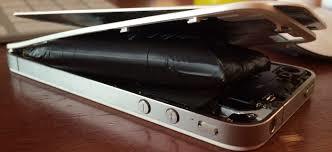
Why are you even reading this? If your battery has outgrown its case, it obviously needs to be replaced! Even if it’s not swelling this badly, immediate action should be taken to dispose of the battery safely. But, beware: You do not want to puncture the pack and release its toxic contents. Early signs of a swollen battery include: a hazy white screen, separation between screen and phone body, or “squishiness” of the screen (no visible separation, but your screen moves a bit when you pinch the edges of your phone). Lucky for you, there’s no need to panic—we’ve outlined exactly what to do with a swollen battery here.
2. Your Phone shuts down unexpectedly
If your iPhone suddenly shuts itself down when the battery is half-drained or so, the calibration may be off. To re-calibrate your iPhone, follow these steps:
- Use your iPhone until it shuts itself down due to low battery.
- Plug your iPhone into a reliable charger and let it charge uninterrupted until it reaches 100 percent.
- Once it’s fully charged, perform a soft reset by holding your sleep/wake button and your home button (sleep/wake and either of the volume buttons on an iPhone X) until the Apple logo shows up.
If that doesn’t solve your battery woes, then the battery may be the culprit and will require replacement.
Techno-babble explanation: Li-ion batteries have a voltage range in which they operate safely, and this is enforced by the power circuitry. As Li-ions age, their internal resistance grows. When the phone does something processor-intensive, it draws significant current. Pass this current through the increased battery resistance, and you get added heat generation and a substantial voltage drop. This voltage slump trips the power circuitry to cut the battery off in order it to protect it from deep discharge. As a result, your phone shuts off as gracefully as a mirrored cat. It then stops drawing current, which allows the battery voltage to float back up to operating parameters, and the cycle is ready to repeat.
Convoluted human analogy: A worn Li-ion battery is like a heart encrusted with cholesterol. If you overexert a cholesterol-laden heart in a burst of physical activity, it may not be able to supply adequate blood flow to your organs, and you could pass out. Likewise, an aging battery can’t circulate electrical current fast enough to keep up with regular phone usage—so it may suddenly shut down.
3. If you’ve got an iPhone 6 or later—and it feels sluggish
If you are running iOS 11.3 or later, you may be a victim of throttling. You can prove or disprove this by following these steps:
Tap the Settings App, select the Battery option in the list, then select Battery Health (beta). Under Peak Performance Capability, if you see this blurb:
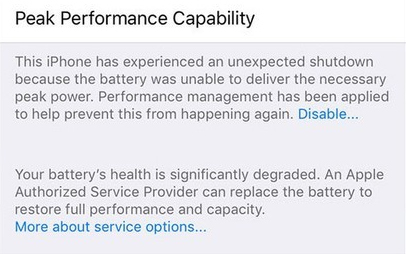
…then your phone is being throttled and would benefit from a battery replacement.
4. If you’re an iPhone 5s or earlier owner—and it has terrible battery life
If you are using an iPhone 5s or earlier, your phone is definitely not affected by CPU throttling. That means the only battery woe you may face is shortened usage time. Since all batteries are consumables, the amount of charge they’re able to hold diminishes as they age. You’ve been sapping away your battery capacity over the years since you bought your device, and by now you’re probably just used to it. Nevertheless, if your phone can’t last two hours without a round of charging, and it’s driving you mad—just replace it.
5. Your Phone only works plugged in
If the battery is completely dead, the phone won’t be able to boot up, even when plugged in. However, if the phone is still able to power up when connected to a power source andfunction properly, the battery or the battery connector are likely culprits of failure.
6. Your Phone is hot (like literally, and not in a Mugatu kinda way)
Your iPhone battery generates heat as it recharges. The lithium-ion batteries inside of your smartphone are designed to internalize the heat, shielding it from the other parts of the phone. So if you’re suddenly noticing your phone is too hot to touch, it might be time to consider a new battery. But keep in mind your surroundings—if you’re taking selfies at the beach under the hot sun, it’s probably the sun. Batteries are temperature sensitive, so be sure to protect them accordingly.
A Caveat: Your battery is usually the culprit, but to avoid unnecessary battery replacement, try this quick test:
- Click on the Settings app and select the Battery option on the left menu.
- You will see two timers: Usage and Standby. Jot the numbers down for both.
- Next, press the Power button to put your device into standby mode, and don’t fidget with it for 10 minutes. If you receive a call or text, you will have to restart the process.
- After 10 minutes have elapsed, turn your device back on and note the Usage and Standby times.

The Standby time should have gone up by 10 minutes, but the Usage should not have increased more than 1-2 minutes. If it has, then your woes will not be remedied by a battery replacement. Failure of this test indicates problems that aren’t directly battery-related, and need additional investigation.
In the end, as with all consumables—batteries get older and need replacing. We hope this list has helped you figure out if your battery has come of age. If it has (and you prefer not to ignore problems and pretend they don’t exist)—you can replace it with our handy dandy
Recent Comments